
The Japanese Keyword Hack is one of the most common SEO spam attacks that affects WordPress websites. Hackers inject thousands of spam pages into your website and fill them with Japanese text, fake products, and malicious links. These pages are usually hidden from normal visitors but visible to Google search engines.
If not fixed quickly, this hack can damage your SEO rankings, reduce organic traffic, and sometimes cause Google ‘This Site May Be Hacked’ warnings or blacklisting.
How to Remove Japanese Keyword Hack From WordPress [Step-by-Step]
In our previous article we show How to Remove Malware from WordPress. In this guide, you will learn how to identify, remove, and prevent the Japanese Keyword Hack from returning. If your website is already hacked, check our WordPress Malware Removal Service for complete malware cleanup and security hardening.
What Is the Japanese Keyword Hack?
The Japanese Keyword Hack is also commonly known as Japanese SEO spam because attackers inject spam content into websites to manipulate search rankings. Instead of targeting website visitors directly, hackers try to use your website authority to rank fake product pages and unwanted content in Google search results
The hack commonly creates:
- Japanese language spam pages
- Fake product listings
- Hidden links
- Doorway pages
- Redirects to malicious websites
- Modified WordPress files
Hackers usually target outdated WordPress installations, plugins, themes, or weak passwords.
How To Identify Japanese Keyword Hack
You can quickly check if your website is infected by searching:
Signs of infection include:
- Japanese text in search results
- Spam URLs
- Unknown pages
- Strange redirects
- Sudden traffic drops
Signs Your Website Has Japanese SEO Spam
Many website owners first notice the problem when strange Japanese spam pages begin appearing in Google results. These pages are often hidden from normal visitors but can still be indexed by search engines. If your website suddenly starts showing unknown product pages or foreign language content, there is a high chance your site has been compromised.
Your website may be infected if you notice any of these signs:
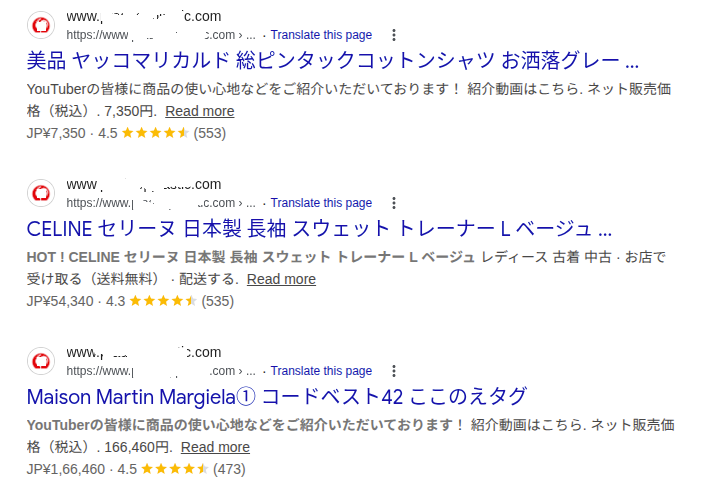
1. Japanese pages appear in Google search results
Search Google:
site:yourdomain.com
If you see strange Japanese text or unknown pages, your site may be infected. You may notice results like:
2. Sudden drop in organic traffic
SEO spam can cause Google to reduce trust in your website which may lead to traffic loss.
3. Unknown pages in Google Search Console
Check Google Search Console:
- Indexed pages
- Coverage reports
- Search appearance reports
- Manual actions
Look for pages you never created.
4. Hidden redirects
Visitors may be redirected to:
- Spam stores
- Fake product pages
- Malicious websites
5. Modified website files
Hackers often inject malicious code into:
- wp-config.php
- functions.php
- .htaccess
- header.php
- database records
How the Japanese Keyword Hack Works
Attackers usually install SEO spam malware after gaining access to a vulnerable WordPress website. Once malware is injected, it can automatically generate thousands of hacked WordPress spam pages and hidden URLs that search engines can discover and index.
The attack generally follows this process:
- Hacker finds a vulnerability
- Malicious files are uploaded
- Backdoors are installed
- Spam pages are generated
- Hidden links are inserted
- Google indexes spam content
Many hacked sites appear normal to administrators while search engines see completely different content.
This technique is often called cloaking.
How To Remove Japanese Keyword Hack in WordPress
A complete WordPress SEO spam removal process involves more than deleting visible spam pages. Hidden malware files, injected database records, malicious redirects, and backdoors must also be removed to prevent the infection from returning.
Follow these steps carefully.
Step 1: Create a Website Backup
Before making changes, create a complete backup of:
- Website files
- Database
- Themes
- Plugins
- Media uploads
If something goes wrong, you can restore the site.
Step 2: Put Website in Maintenance Mode
Temporarily limit access while cleaning malware.
This prevents hackers from injecting additional code.
Step 3: Scan Website Files
Look for suspicious code in:
/wp-content/uploads/
/wp-includes/
/wp-admin/
Common signs include:
- Random file names
- Encoded code
- Base64 strings
- Long unreadable scripts
These functions are not always malicious but should be reviewed carefully.
Step 4: Remove Suspicious Files
Delete:
- Unknown PHP files
- Fake plugin folders
- Injected scripts
- Hidden backdoors
Hackers often create files such as:
wp-cache.php
class-wp.php
.php files inside uploads folder
Step 5: Replace Core WordPress Files
Download a fresh WordPress copy and replace:
- wp-admin
- wp-includes
Do not overwrite:
- wp-content
- wp-config.php
This removes modified core files.
Step 6: Scan Themes and Plugins
Check all plugins and themes:
- Remove unused plugins
- Delete nulled themes
- Update everything
Outdated plugins are a common entry point.
Step 7: Clean Database Spam
Hackers often inject spam into database tables.
Check:
wp_posts
wp_options
wp_postmeta
Look for:
- Japanese text
- Spam URLs
- Hidden scripts
Delete suspicious entries.
Step 8: Remove Hidden Redirects
Check:
.htaccess
wp-config.php
header.php
functions.php
Remove malicious redirects and injected code.
Step 9: Clear Website Cache
Clear:
- WordPress cache
- CDN cache
- Browser cache
- Server cache
Old infected files can continue appearing after cleanup.
Step 10: Request Google Reindexing
After cleaning your website, you should remove Japanese spam URLs from Google’s search index. Leaving spam pages indexed may continue affecting search visibility even after malware removal is complete.
You can use the URL removal tool in Google Search Console to remove spam URLs from Google temporarily while Google recrawls your cleaned website.
Open Google Search Console:
- Remove spam URLs
- Submit clean URLs
- Request indexing
Google may take several days to update results.
How To Remove Spam Pages From Google Search
Use the URL removal tool inside Google Search Console.
Remove:
- Japanese URLs
- Spam directories
- Fake pages
After removal:
- Submit a fresh sitemap
- Request indexing
This helps Google recrawl your clean site faster.
How To Prevent Japanese Keyword Hack in Future
After cleanup, secure your website. Update everything regularly and Keep updated:
- WordPress core
- Themes
- Plugins
- Use strong passwords with Uppercase letters, Numbers and Symbols
Enable Two-Factor Authentication.
Two-factor authentication adds another security layer.
Remove unused plugins
Inactive plugins can still create vulnerabilities.
Install website monitoring
Security monitoring can detect:
- File changes
- Malware
- Login attempts
- Suspicious activity
- Take regular backups
Daily backups help you recover quickly.
Real Example of Japanese Keyword Spam
One infected WordPress website had more than 3,500 spam pages indexed in Google. The site looked normal to visitors, but Google was indexing fake Japanese product pages created by attackers.
After malware cleanup, backdoor removal, and URL removal requests, spam pages gradually disappeared from search results over several weeks.
Frequently Asked Questions
Can Japanese Keyword Hack affect SEO?
Yes. It can create spam pages, reduce rankings, and damage website authority.
Will deleting spam pages fix the issue?
No. If backdoors remain, hackers can reinfect the site.
How long does malware removal take?
Simple infections may take a few hours while severe infections can require more time. We clean the hack same day in our WordPress hack cleanup Service.
Can Google remove spam pages automatically?
No. You usually need to clean the website and request reindexing.
Can the hack return after cleanup?
Yes. If vulnerabilities remain open, attackers can reinfect the website.
Final Thoughts
The Japanese Keyword Hack can create serious SEO problems if ignored for a long time. Whether the issue involves Japanese SEO spam, hidden redirects, or spam page generation, a complete cleanup process is important. Proper malware removal, security hardening, and ongoing monitoring help keep your website protected from future attacks.
The Japanese Keyword Hack can seriously damage your website traffic and search rankings. Removing visible spam pages alone is not enough because attackers usually leave hidden backdoors behind.
A complete cleanup should include:
- Malware removal
- Database cleanup
- Backdoor removal
- Security hardening
- Search Console cleanup
- Ongoing monitoring
Fixing the root cause is the best way to prevent future infections.