
Create Image Gallery in WordPress is very easy. Today we are going to tell you how to create an image gallery in WordPress without any plugin.
How to Create an Image Gallery in WordPress
First, Create New Post/Page. You can insert the gallery to the existing post by clicking Edit Post. Click on Add Media button from the post editor just like below image.

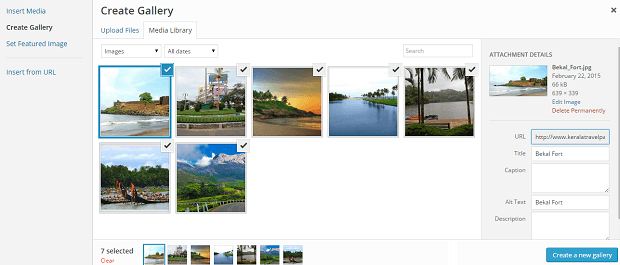
Now a popup window will open. click on the Create Gallery. Here you can choose existing images or can upload the new images which you want to insert into the gallery. After selecting images click on the create new gallery button.
Now a new window will open just like the below image. Here you can add Caption to your image. You can choose columns show to your image gallery and rearrange the order of images by simply dragging and dropping. After doing this, click on the update gallery button.

The new Gallery will be inserted your WordPress post. Now you can check the preview of your gallery. If you want to do any changes to it just click on the image box and edit gallery popup window will open. If you satisfied with the looks of the gallery then publish your WordPress image Gallery.

You can insert the gallery to both Page and posts in WordPress by the same process. If your theme support lightbox when anyone clicks on the image of your gallery page, the lightbox popup will open.

You have all done. You can insert any number of gallery to existing or new WordPress Posts and Pages.